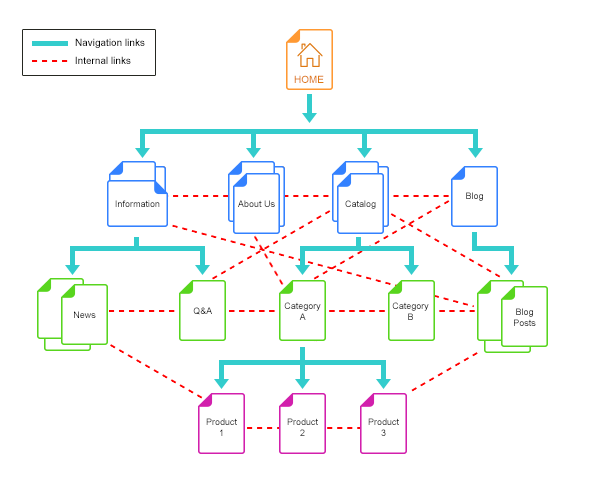
Breadcrumbs are a small navigation element, but they can play a useful role in both website usability and search understanding. A well-designed breadcrumb trail helps visitors understand where a page sits within a site’s hierarchy, while BreadcrumbList structured data can give search engines additional context about that hierarchy.
This guide explains how to build breadcrumb SEO into a modern website without treating breadcrumbs as a standalone ranking trick. The goal is a clearer information architecture, better navigation, consistent internal linking, and structured data that accurately represents the page.
What Is Breadcrumb SEO?
Breadcrumb SEO is the practice of designing and implementing breadcrumb navigation so that it accurately communicates a page’s position within a website. It combines three related areas:
- User navigation: visitors can move back to broader sections without repeatedly using the browser back button.
- Site architecture: the breadcrumb reflects the logical relationship between a section, category, and individual page.
- Structured data: eligible pages can provide BreadcrumbList markup that helps Google understand the page hierarchy.
Breadcrumbs should therefore support an architecture that already makes sense. Adding a breadcrumb trail to a confusing site structure does not fix the underlying problem.
Why Breadcrumbs Matter for SEO
Google describes breadcrumbs as a way to indicate a page’s position in the site hierarchy and says they may help users understand and explore a site. Google also recommends that breadcrumb markup represent a typical user path rather than simply copying the URL structure.
That distinction is important. A URL might be /products/seo-tools/keyword-research/, while the most useful navigation path could be Home → SEO Tools → Keyword Research. The breadcrumb should reflect the user’s logical path through the site, not blindly reproduce every technical URL segment.
Breadcrumbs also create another useful internal navigation layer. On large sites, this can help users move from a specific article or product to the broader topic that contains it.
Design the Hierarchy Before the Breadcrumb
Start with the site’s information architecture. For a content-focused website, a simple structure might look like:
Home
├── SEO
│   ├── SEO Strategy
│   ├── Technical SEO
│   └── SEO Engineering
├── Content Marketing
│   ├── Content Strategy
│   └── Content Distribution
└── Ecommerce SEO
    ├── Product Page SEO
    └── Category Page SEO
An individual article can then expose a breadcrumb such as:
Home → SEO Engineering → JavaScript SEO
The exact hierarchy depends on the site’s content model. The key is consistency: a page should not appear to belong to one section in the breadcrumb while its navigation, internal links, and taxonomy place it somewhere completely different.
For a deeper look at scalable information architecture, see our internal linking strategy guide and content hub strategy guide.
Keep Breadcrumb Labels Clear and Useful
Breadcrumb labels should be short, descriptive, and understandable without requiring the visitor to decode internal naming conventions.
For example:
- Use Technical SEO instead of TS-01.
- Use Product Page SEO instead of PPSEO.
- Use the actual article or product name for the final breadcrumb when it remains readable.
Do not fill breadcrumbs with keywords simply because they are an SEO element. The label should describe the destination accurately. Over-optimizing breadcrumb text can make navigation less useful and can create inconsistencies across the site.
Breadcrumbs and Internal Linking
Breadcrumbs should complement, not replace, contextual internal links.
For example, an article about JavaScript SEO might link contextually to related technical resources within the body of the article. The breadcrumb provides the broader path back to the relevant section. These links serve different navigation purposes:
- Breadcrumb: broad hierarchical navigation.
- Contextual link: topical relationship between two pieces of content.
- Primary navigation: access to major site sections.
This layered approach is especially useful when building topic clusters. Our SEO strategy framework explains how site structure, content planning, and internal connections can work together rather than being treated as isolated SEO tasks.
Implement BreadcrumbList Structured Data Carefully
For pages where breadcrumb markup is appropriate, use the BreadcrumbList schema and make sure the structured data accurately matches the visible breadcrumb trail.
A simplified JSON-LD example looks like this:
{
  "@context": "https://schema.org",
  "@type": "BreadcrumbList",
  "itemListElement": [
    {
      "@type": "ListItem",
      "position": 1,
      "name": "Home",
      "item": "https://example.com/"
    },
    {
      "@type": "ListItem",
      "position": 2,
      "name": "Technical SEO",
      "item": "https://example.com/technical-seo/"
    },
    {
      "@type": "ListItem",
      "position": 3,
      "name": "JavaScript SEO"
    }
  ]
}
The final page in the breadcrumb can be represented without an item URL when appropriate. More importantly, the structured data should describe the actual page hierarchy and follow Google’s structured data guidelines.
Google recommends validating structured data and checking how the page is seen by Google. Structured data can help search engines understand content, but it does not guarantee a particular search-result treatment.
Common Breadcrumb SEO Mistakes
1. Copying the URL structure blindly
URL folders and user navigation paths are not always identical. Design breadcrumbs around the logical user journey rather than technical URL segments.
2. Creating multiple breadcrumb paths for the same page
If the same page appears under several competing hierarchies, decide which primary path best represents the site’s information architecture. Consistency makes the site easier to maintain.
3. Hiding the visible breadcrumb but keeping only schema markup
Structured data should describe page content accurately. Do not use markup as a substitute for useful navigation.
4. Using vague labels
Labels such as “More,” “Page,” or internal database names provide little navigational value. Prefer labels that clearly identify the destination.
5. Treating breadcrumbs as a ranking shortcut
Breadcrumbs are an architectural and usability feature first. Their SEO value comes from helping search engines and users understand relationships between pages, not from adding a few extra keywords to a template.
A Practical Breadcrumb Audit Checklist
- Does every important page have a logical parent or section?
- Does the visible breadcrumb match the site’s information architecture?
- Are breadcrumb labels descriptive and consistent?
- Does the breadcrumb provide useful navigation for visitors?
- Does BreadcrumbList markup accurately represent the visible breadcrumb?
- Are the URLs in the markup canonical and accessible?
- Have you validated the structured data?
- Does the implementation work on mobile?
- Are there duplicate or conflicting breadcrumb paths?
- Does the breadcrumb complement contextual internal links rather than replace them?
Final Takeaway
Breadcrumb SEO works best when it is treated as part of the site’s information architecture rather than as an isolated optimization task. Start with a clear hierarchy, create useful navigation labels, connect related pages with contextual internal links, and use structured data to describe the hierarchy accurately.
For larger websites, this approach also makes content growth easier to manage. As new pages are added, the breadcrumb system gives visitors and search engines another consistent signal about where each page belongs.
For more practical SEO implementation guidance, explore LogixScale’s resources on internal linking, SEO content briefs, and WordPress SEO metadata audits.