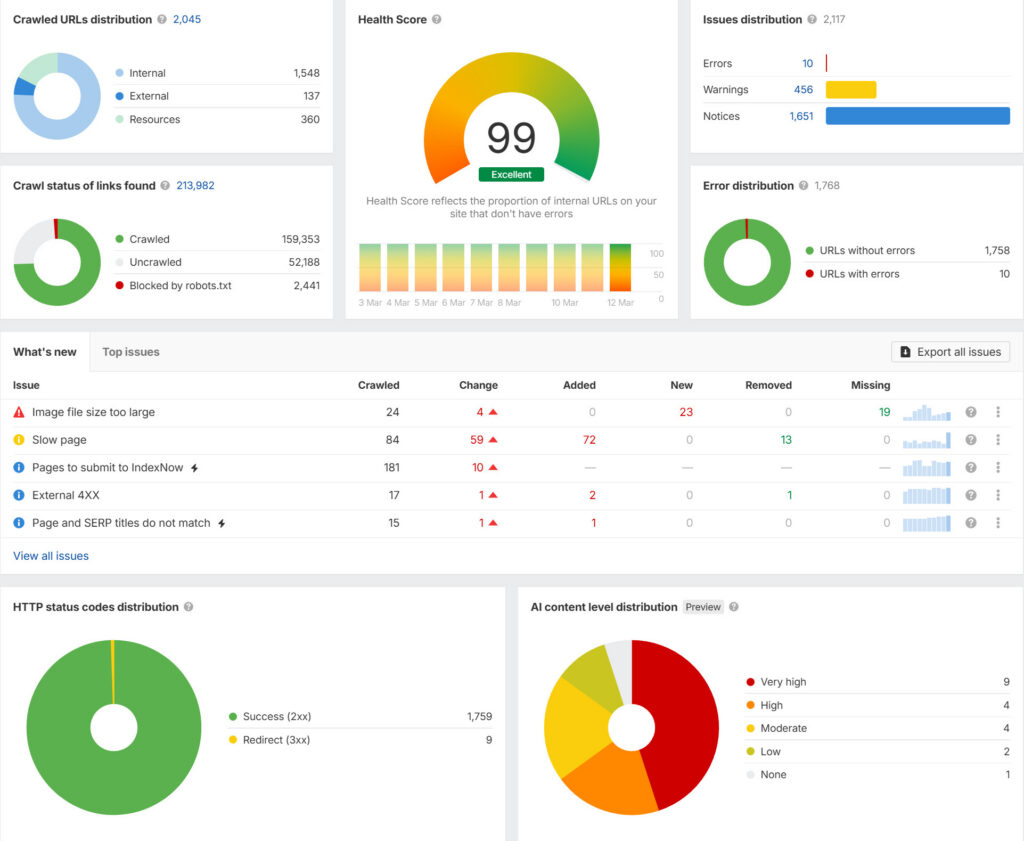
Technical SEO is the foundation that helps search engines discover, understand, and access your website. A page can have excellent content and still struggle if important URLs are blocked, duplicated, redirected incorrectly, or difficult to crawl.
This practical technical SEO audit checklist is designed for business owners, marketers, developers, and SEO teams who want a repeatable way to find the issues that can limit organic search performance.
What is a technical SEO audit?
A technical SEO audit reviews the parts of a website that affect crawling, indexing, rendering, site architecture, and search-engine understanding. It is different from a content audit: the goal here is to make sure valuable pages can be discovered, accessed, understood, and maintained.
1. Check crawlability first
Start with robots.txt. Look for rules that accidentally block important sections, assets, or URLs. A robots.txt rule should not be used as a substitute for controlling whether a page belongs in the search index.
- Confirm the robots.txt file loads.
- Check that important page paths are not blocked.
- Review rules after redesigns or migrations.
- Make sure staging environments are not accidentally exposed.
2. Review indexability
Check important templates for accidental noindex directives. Review canonical tags, HTTP headers, and status codes together rather than looking at only one signal.
- Important pages should be indexable.
- Canonical URLs should point to the preferred version.
- Remove accidental noindex directives from production templates.
- Investigate pages that are indexed but should not be.
3. Find broken and redirected URLs
Crawl the site and identify 4xx responses, redirect chains, loops, and unnecessary redirects. A clean redirect architecture is especially important after URL changes.
For a permanent URL move, use a server-side permanent redirect from the old URL to the most relevant new destination. Avoid redirecting many unrelated URLs to the homepage simply because it is convenient.
4. Audit your XML sitemap
Your XML sitemap should represent the URLs you actually want search engines to discover and index. Review it after major content changes, migrations, and taxonomy updates.
- Use canonical, indexable URLs.
- Remove broken or redirected URLs.
- Keep sitemap URLs consistent with the site’s preferred protocol and hostname.
- Submit and monitor the sitemap through Search Console.
5. Review internal links
Important pages should be reachable through normal crawlable links. Look for orphan pages, very deep pages, weak navigation paths, and internal links pointing to redirected URLs.
Use descriptive anchor text that helps users understand where a link goes. Internal linking should reflect the site’s information architecture, not simply repeat keywords.
6. Check JavaScript rendering
Modern sites often rely heavily on JavaScript. Test whether important text, links, titles, canonical information, and structured data are available in the rendered page.
If a critical navigation link or product description exists only after a client-side interaction, verify that search engines can still discover and process the relevant content. For a deeper implementation guide, see JavaScript SEO: crawl, render and index modern sites.
7. Review structured data
Structured data can help search engines understand supported content types. Use the markup that genuinely matches the page and validate implementation before deployment.
Google’s documentation recommends validating structured data and checking how Google sees the page before expecting search features to appear. Structured data does not guarantee a rich result.
8. Check page experience and Core Web Vitals
Review loading performance, interaction responsiveness, and layout stability. Look at both laboratory testing and real-user data where available. Performance improvements should focus on the parts of the experience that matter to visitors, not just chasing a single score.
9. Audit URL structure
Keep URLs understandable and stable. Avoid unnecessary parameter variations, duplicate paths, and frequent structural changes. If a URL must change, plan the redirect and update internal references.
10. Review HTTPS and canonical consistency
Make sure HTTP redirects to HTTPS and that internal links consistently use the preferred version. Check www/non-www or other hostname variations and make sure only the intended canonical version is used.
The 25-point technical SEO checklist
- Robots.txt accessible
- Important URLs crawlable
- No accidental noindex
- Canonical tags reviewed
- HTTPS enforced
- Preferred hostname consistent
- XML sitemap valid
- Sitemap contains preferred URLs
- 404 pages reviewed
- Redirect chains removed
- Redirect loops removed
- Internal links checked
- Orphan pages identified
- Navigation crawlable
- JavaScript-rendered content tested
- Structured data validated
- Page titles reviewed
- Meta descriptions reviewed
- Duplicate URLs investigated
- Pagination reviewed where relevant
- Image URLs and alt text reviewed
- Core Web Vitals monitored
- Mobile rendering checked
- Search Console coverage reviewed
- Post-release monitoring scheduled
How often should you run a technical SEO audit?
There is no single schedule for every business. A small, stable site may need a periodic audit, while a frequently changing ecommerce or JavaScript-heavy site benefits from continuous monitoring. Always perform a focused audit after a redesign, migration, major CMS change, URL restructure, or large template release.
11. Review Search Console after technical changes
A technical SEO audit should not end when the checklist is completed. After important template, indexing, structured-data, or navigation changes, use Google Search Console to monitor how Google is seeing the site.
- Review indexing and page-level inspection for important URLs.
- Check Performance reports for meaningful changes in clicks, impressions, and search appearance.
- Review relevant structured-data reports after deploying or changing markup.
- Submit or confirm the XML sitemap when the site’s URL set changes materially.
Google recommends using Search Console after deploying structured data, releasing new templates or code, and periodically analyzing traffic. It also recommends validating structured data and using URL Inspection to check how Google sees the page. Google’s structured data guidance provides the current validation and monitoring workflow.
12. Audit visual and multimodal search readiness
Technical SEO is no longer only about text URLs. Google announced new Search Console reporting for web multimodal search on September 24, 2026. The new reporting covers searches involving Google Lens, Circle to Search, image uploads, and Chrome’s “Search this image” experience. The data is available through a multimodal search type filter in Performance reporting as the rollout reaches sites receiving this traffic. Google Search Central’s announcement explains the update.
For a technical audit, review whether important visual content is technically accessible and clearly associated with the page:
- Use relevant, high-quality images where they genuinely help the page.
- Provide accurate alternative text when the image conveys useful information.
- Use appropriate image metadata and structured data where applicable.
- Make sure important images are not unnecessarily blocked from crawling.
- Check that image URLs, responsive image implementations, and canonical page relationships remain consistent after template changes.
Google’s recent documentation updates also clarify preferred-image practices, including the role of structured data and og:image metadata in determining image thumbnails for Search and Discover. Google’s Search documentation updates tracks these changes.
13. Check video and media markup when your site uses it
If a website publishes video content, review the technical implementation instead of treating the embedded player as enough. Confirm that the page contains useful visible context, the video is accessible to users, and any structured data accurately represents the content.
Google’s September 2026 documentation updates added the creator property to its VideoObject documentation and clarified supported interaction statistics. This is a reminder to review media markup against current Google documentation rather than copying an old schema template indefinitely. See the current Search documentation updates.
14. Add a post-release regression check
Technical SEO should be treated as an ongoing engineering process. After a major deployment, compare the new site against the previous state rather than assuming that a successful release means the SEO layer is intact.
| Area | Post-release check | What to look for |
|---|---|---|
| Crawlability | Crawl important templates | Unexpected blocks, broken links, status-code changes |
| Indexability | Inspect representative URLs | Noindex, canonical, or indexing changes |
| Structured data | Validate changed templates | New errors or missing properties |
| Performance | Compare real-user and lab signals | Regression after new scripts, images, or components |
| Internal linking | Check key journeys | Orphaned pages, redirects, broken navigation |
| Search visibility | Review Search Console | Unexpected changes in impressions, clicks, or indexing |
Run these checks after redesigns, CMS changes, URL migrations, major template releases, and significant JavaScript changes. Google notes that Search Console is useful after releasing new templates or updating code, and that technical changes can take time to be reflected in crawling and indexing data. Google Search Central provides the current monitoring guidance.
15. Technical SEO audit worksheet
For recurring audits, record the finding, affected URLs, severity, owner, action, and verification status. This turns an audit from a one-time report into a maintainable engineering backlog.
| Finding | Affected URL/template | Priority | Fix | Verified |
|---|---|---|---|---|
| Indexability issue | URL or template | High | Remove incorrect blocking directive | Pending |
| Broken internal link | Source page | Medium | Update to the correct destination | Pending |
| Structured-data issue | Template | Medium | Correct markup and validate | Pending |
| Performance regression | Template/page type | Medium | Optimize asset or script loading | Pending |
| Image/metadata issue | Page/template | Low–Medium | Improve image or metadata implementation | Pending |
Related LogixScale resources
Use this audit with the website migration SEO checklist when a site is being rebuilt, the internal linking strategy guide for architecture and crawlable links, and the Core Web Vitals guide for performance checks.
Technical SEO video resource
Google Search Central’s official SEO for developers guidance is useful alongside this checklist when validating crawlability, rendering, and technical implementation.
Final takeaway
Technical SEO is less about finding one magical issue and more about keeping the website’s discovery and indexing system healthy. Start with crawlability and indexability, then move through URLs, redirects, internal links, rendering, structured data, and performance.
If your website is being rebuilt or has accumulated technical debt, a structured audit can turn a vague SEO problem into a prioritized engineering backlog.
Related: Website Migration SEO · SEO Services · Technical SEO