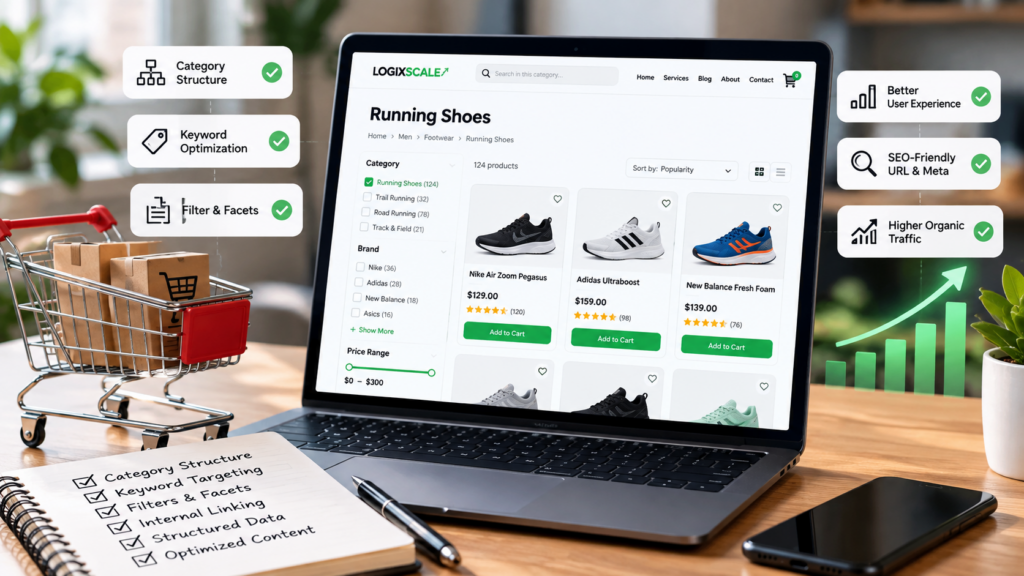
Category pages are often the bridge between broad commercial intent and individual product pages. They can help shoppers narrow choices while giving search engines a clear understanding of what a collection represents.
What makes a strong ecommerce category page?
A useful category page has a clear purpose, a meaningful set of products, descriptive content, crawlable links, sensible URLs, and navigation that helps users move toward the product they need.
1. Match the category to real search intent
Start by defining what the category represents. “Running shoes” and “women’s waterproof trail running shoes” may both be useful, but they serve different intents and should not automatically become near-duplicate pages.
2. Create useful category introductions
Write a concise introduction that explains what the category contains, who it is for, and how shoppers can choose. Avoid inserting a block of generic SEO copy above the products simply to increase word count.
3. Make product links crawlable
Important product pages should be reachable through normal HTML links. If products only appear after a client-side filter or interaction, verify that the important product URLs remain discoverable.
4. Handle filters and facets carefully
Faceted navigation can create thousands of URL combinations. Not every combination deserves a search-indexable page.
Define which filtered combinations represent genuine search demand and which should remain navigational states. Review crawl patterns and duplicate content risks before allowing large numbers of parameter URLs to proliferate.
5. Build a logical category hierarchy
A clear hierarchy helps both shoppers and search engines understand relationships:
- Home
- Category
- Subcategory
- Product
Do not create unnecessary levels simply to make the URL longer. Architecture should follow the way customers understand the catalog.
6. Use breadcrumbs
Breadcrumbs provide useful navigation context and can help communicate the relationship between a product and its category hierarchy. If you use BreadcrumbList structured data, make sure it reflects the visible breadcrumb trail accurately.
7. Optimize titles without stuffing
A category title should clearly describe the collection. Page titles should communicate the product category and meaningful modifiers where appropriate. Avoid repetitive lists of keywords.
8. Improve category-to-product internal linking
Category pages naturally provide strong internal links to products. Make sure the links use the correct canonical product URLs and are not routed through unnecessary redirects.
9. Use product structured data on product pages
Google’s documentation distinguishes product structured data for individual product pages from category or collection pages. Product rich-result eligibility focuses on pages that are about a specific product or variants of the same product.
That means your category page should focus on navigation and collection intent, while individual product pages carry the detailed product information and relevant product markup.
10. Improve category-page UX
Visitors should be able to understand the category quickly. Useful controls include sorting, meaningful filters, stock visibility, price information, clear product cards, and easy pagination or loading patterns.
11. Watch duplicate and thin category pages
Two categories with almost identical products and descriptions may compete with each other. Consolidate overlapping categories or differentiate their purpose and inventory where there is a legitimate business reason.
Category page checklist
- Clear search intent
- Descriptive category name
- Useful introduction
- Logical URL
- Visible breadcrumbs
- Crawlable product links
- Controlled faceted navigation
- Useful filters
- Unique metadata
- Strong category-to-product linking
- Mobile-friendly product grid
- Fast images and assets
- Clear pagination or loading behavior
- Relevant internal links to subcategories
- Product markup implemented on appropriate product pages
Final takeaway
A category page should not exist just because an ecommerce platform can generate it. It should help customers find a meaningful collection of products and give search engines a clear understanding of that collection.
Watch: Google Search Central ecommerce SEO guidance
This official Google Search Central video covers practical ecommerce SEO considerations, including product variants, deals pages, content breadth, and technical SEO basics.
Related LogixScale resources
Continue with our ecommerce product page SEO guide, internal linking strategy guide, technical SEO audit checklist, and ecommerce SEO service.